Awards voting lets every team vote for the season's award winners, such as MVP, Cy Young and Rookie of the Year. You pick the awards, open a ballot for one season, and owners vote. When voting is done, you Finalize the ballot, which counts the votes and saves the winners.
Everything here starts on League Admin. Choose the Awards Voting tile to open the Awards Voting Setup page.
You do not need to touch League Info to run a vote. Opening a ballot turns Enable Awards Voting on, and closing or finalizing the last open ballot turns it off again. While it is on, the Awards tile on the league dashboard reads "Cast Your Vote for League Awards".
1. Choose the awards
The Awards To Vote On table lists the awards owners will vote on.

- Edit lets you change an award's Order on the ballot, its Sub-League, and whether it is Active or Auto. Choose Save when you are done.
- Remove takes an award off. If the award already has winners from past seasons, a box asks whether to Remove & Delete All Winners or Deactivate it. Deactivate hides the award but keeps its past winners.
- To add an award, use Add Award (Voting or Auto-Assign) below the table: pick the Award, then choose Add Award.
An award marked Auto is not on the ballot. It is worked out from stats instead (see Auto-Compute Awards at the end). Those awards are listed under Awards To Auto-Assign.
In a league with sub-leagues, you can add the same award once per sub-league (for example an MVP for each league). Pick the sub-league under Sub-League when you add it. Candidates for that award then come only from that sub-league.
An award that already has votes cannot be removed. Clear the votes first (see step 5).
2. Set up the ballot
Under Open Voting for a Season, pick the season and choose Set Up Ballot →.
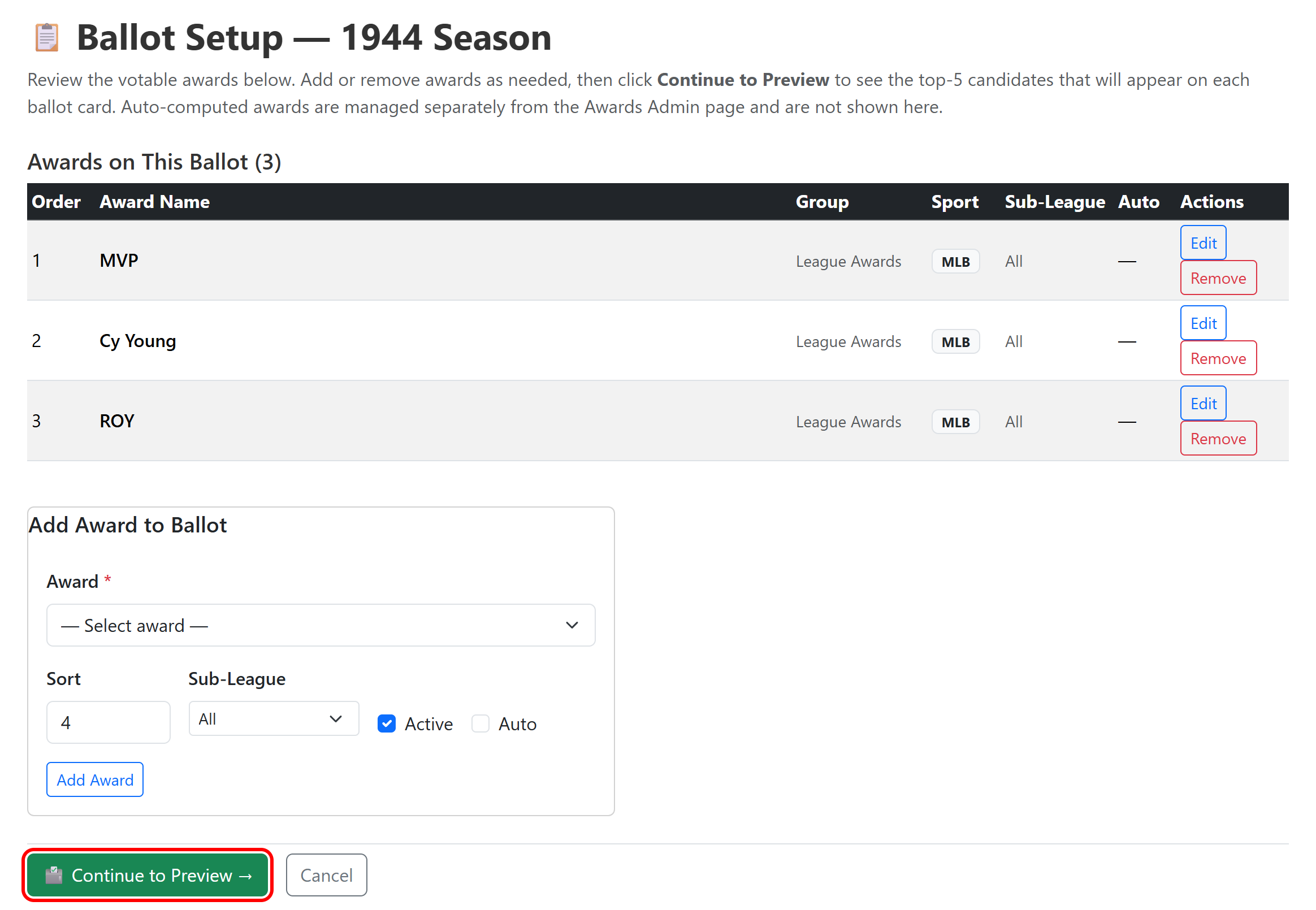
The Ballot Setup page lists the awards that will be on this ballot under Awards on This Ballot. You can Edit or Remove an award here too, or add one with Add Award to Ballot.
Choose Continue to Preview →.
The season list only shows seasons that have stats loaded and have no ballot yet. A season that is open, or that has already been finalized, is left out. If the box says "No seasons available", load the season's stats first.
The first time your league sets up a ballot, the award list is filled in for you from a standard set, with the message "First ballot for this league."
3. Check the preview and open voting
The Ballot Preview page shows the top candidates for each award, worked out from that season's stats. This is what owners will see. The candidates can take several seconds to appear.
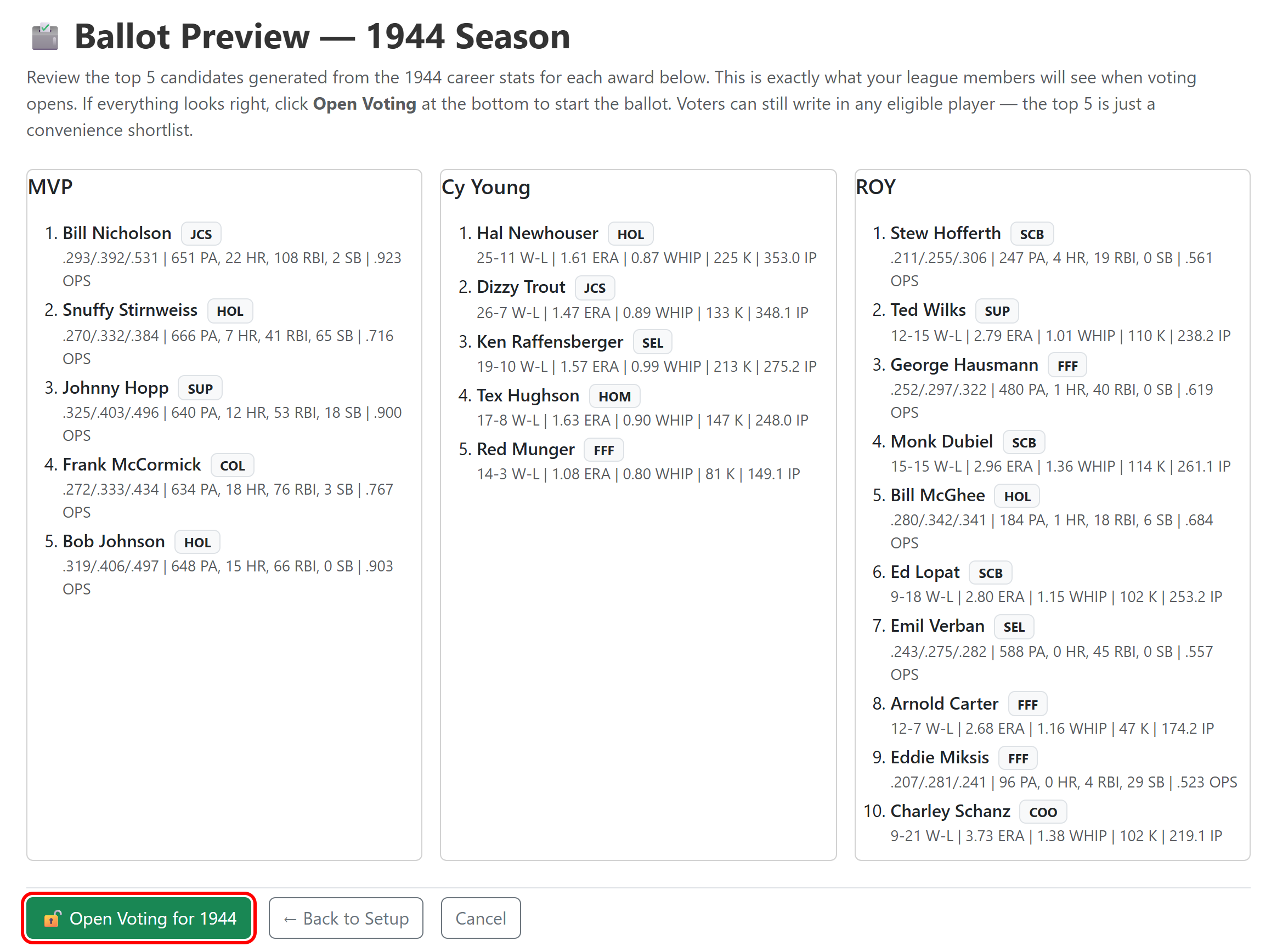
- Check each award's list. Most awards show the top 5. ROY can show up to 5 hitters and 5 pitchers.
- If you want to change the awards, choose ← Back to Setup.
- When it looks right, choose Open Voting for 1944 (the button names your season), then OK to confirm.
You land back on Awards Voting Setup. The badge at the top now says Voting Open, and a message confirms it. If your league has a league email address, every owner is emailed a link to the ballot. If not, the message says that no notification was sent, and you will need to tell owners yourself.
Owners also see "Awards voting is open" under Needs your attention on the league dashboard, with a Vote Now button. Owners can always vote for a player who is not on the list, using the write-in box.
4. Watch who has voted
While a ballot is open, Awards Voting Setup shows Voter Turnout for that season.
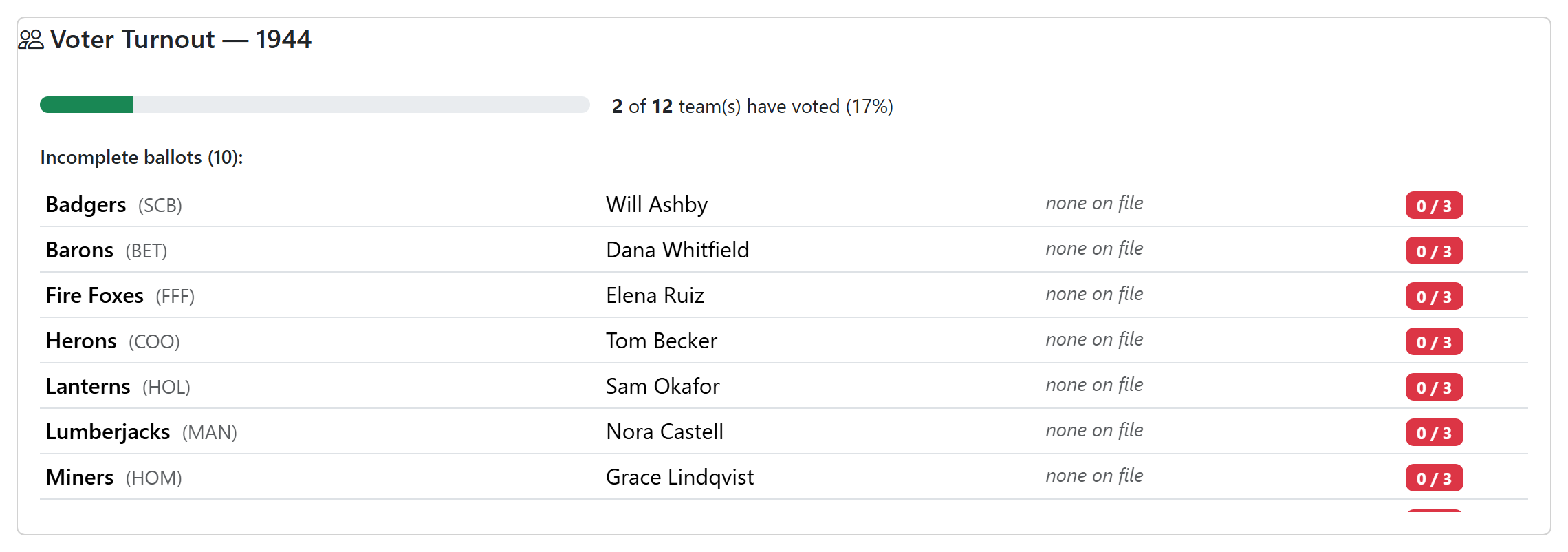
- "2 of 12 team(s) have voted" counts every team that has voted for at least one award.
- Incomplete ballots lists every team that has not voted for every award yet, with its owner, email and progress (for example 0 / 3).
- Email Non-Voters sends a reminder email to each team on that list. The button only appears when at least one of those owners has an email address on file.
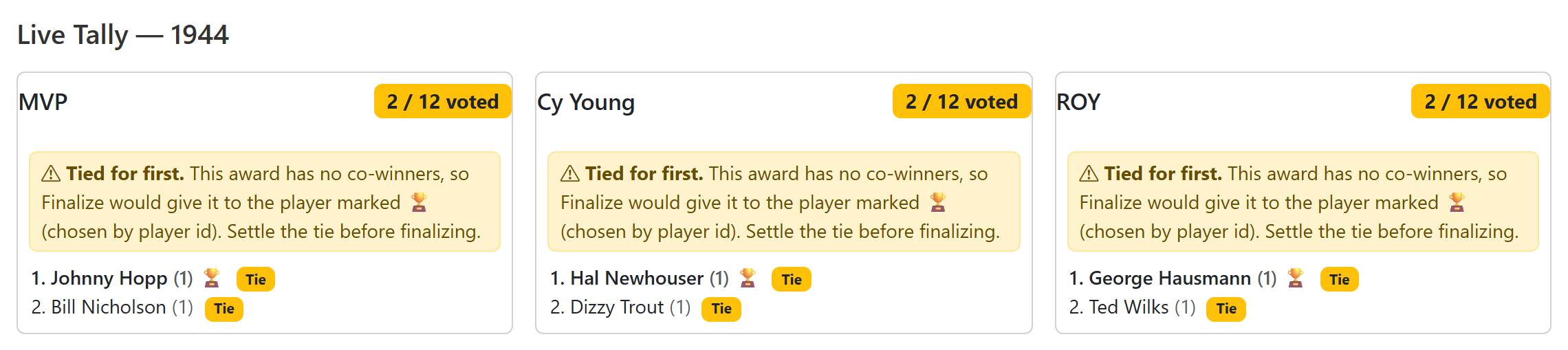
Below the turnout card, Live Tally shows the leading players for each award so far, with the number of teams that have voted on it. It appears only on this admin page. The trophy marks the player Finalize would save if you finalized now.
Ties
For each award, the player with the most votes wins. Some awards allow co-winners: when players tie on those, every tied player is saved. Most awards do not. When players tie for first on one of those, the Live Tally marks each of them Tie and shows Tied for first. It means Finalize would give the award to only one of them, the player marked with the trophy, picked by player ID and not by anything about the players. Settle the tie before you finalize, for example by asking a team that has not voted yet to vote.
5. Close, finalize or clear
Each open season has a row of buttons under Currently Open for Voting.

Here is what each one really does:
| Button | What it does |
|---|---|
| Results | Opens the league's Awards Results page for that season in a new tab. Nothing changes. |
| Finalize | Counts the votes, saves the winner of each award, and closes voting. This is the normal way to end a vote. |
| Clear Votes | Deletes every vote cast for that season. Voting stays open, so owners can vote again. This cannot be undone. |
| Close | Stops voting, but does not save any winners. The votes are kept. |
To end the vote, choose Finalize, then OK. The message tells you how many awards were counted. If your league has a league email address, the results are emailed to it.
If any award is tied for first, a badge such as 3 tied sits next to Finalize (point at it to see which awards), and the box that asks you to confirm names the tied awards before you choose OK.
Close saves no winners. Its confirmation box says so, and the season's Awards Results page then says voting is closed but the results have not been finalized yet. A closed season has no Finalize button. To finish it, pick the same season under Open Voting for a Season, choose Set Up Ballot →, open voting again, and then choose Finalize. The votes are still there.
Once a season is finalized, it moves to Past Ballots. There you can open its Results, or use the envelope button to send the results email to the league again.
The "Public results" setting
Voting Visibility (while ballot is open) has one setting, Public results.
- Unticked (the default): while voting is open, the Awards Results page tells owners "Live results are hidden" and shows no vote counts.
- Ticked: the Awards Results page shows the running vote counts while voting is open.
Choose Save Settings after you change it. Either way, once a ballot is finalized the results page shows the winners to everyone.
Auto-Compute Awards
Some awards do not need a vote: stat leaders like a home run leader, the Triple Crown, Gold Glove and so on. These are the awards marked Auto. League Toolkit works out their winners from the season's stats.
This happens in two places:
- When you load final results. The APBA Stat Loader, APC Baseball Loader, APC Football Loader and APC Hockey Loader have a Compute Auto-Awards option. Tick it on the final load of the season. See Start a new season, end to end.
- By hand. Choose Auto-Compute Awards at the top of Awards Voting Setup. Under Pick a Season, pick the season and choose Compute Awards. Check the winners, then choose Save Selected Awards. Saving here never changes the winners of voted awards.
To add every stat-based award at once, choose Add All Auto-Eligible Awards next to Awards To Auto-Assign on Awards Voting Setup.
For the owner's side of the vote, see Vote for awards and the Hall of Fame.