League Info holds the settings for the whole league. Open it from the League Info tile on League Admin.
The page is split into sections. Choose a section's title bar to fold it open or shut. Nothing is saved until you choose Save Changes in the bar at the bottom of the page, and that one button saves every section at once.
Settings marked Owners see it in the tables below change what owners see: a tile, a tab, a button or a page. Check those before the season starts, so owners are not surprised.
Some changes, such as the colours and the logo, can take up to two minutes to show on the site after you save.
Basic Info
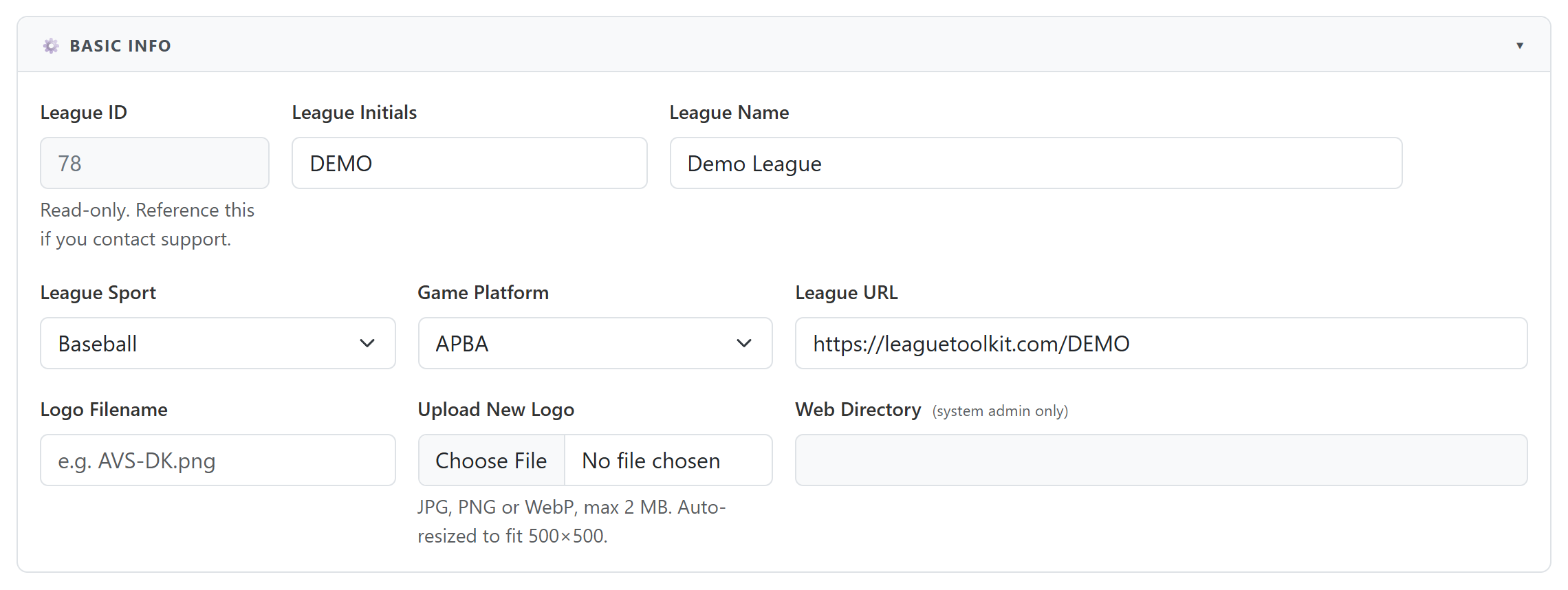
| Setting | What it does | Who it affects |
|---|---|---|
| League ID | The league's number. You cannot change it. Quote it if you contact support. | Nobody |
| League Initials | The league's short name. It is also part of every web address in the league, for example /DEMO/.... Initials must be unused by any other league and safe to use in a web address. |
Everyone |
| League Name | The league's full name, shown across the site. | Owners see it |
| League Sport | Baseball, Football or Hockey. Many pages, tabs and tools depend on it. | Everyone |
| Game Platform | The game your league plays with. It decides which loader and import tiles appear on League Admin, and which card ratings and draft pools are used. | Everyone |
| League URL | Your league's web address, if it has one of its own. | Owners see it |
| Logo Filename | The name of the league logo file. Leave it alone if you upload a logo instead. | Owners see it |
| Upload New Logo | Choose a JPG, PNG or WebP file (2 MB at most) to replace the league logo. It is resized to fit 500×500. An uploaded file wins over Logo Filename. The logo shows in the top bar and on the league banner. | Owners see it |
| Web Directory | Set by the site admin. You can see it but not change it. | Nobody |
Changing League Initials changes the league's web address. Links and bookmarks that use the old initials stop working, so tell your owners first.
Years & Draft
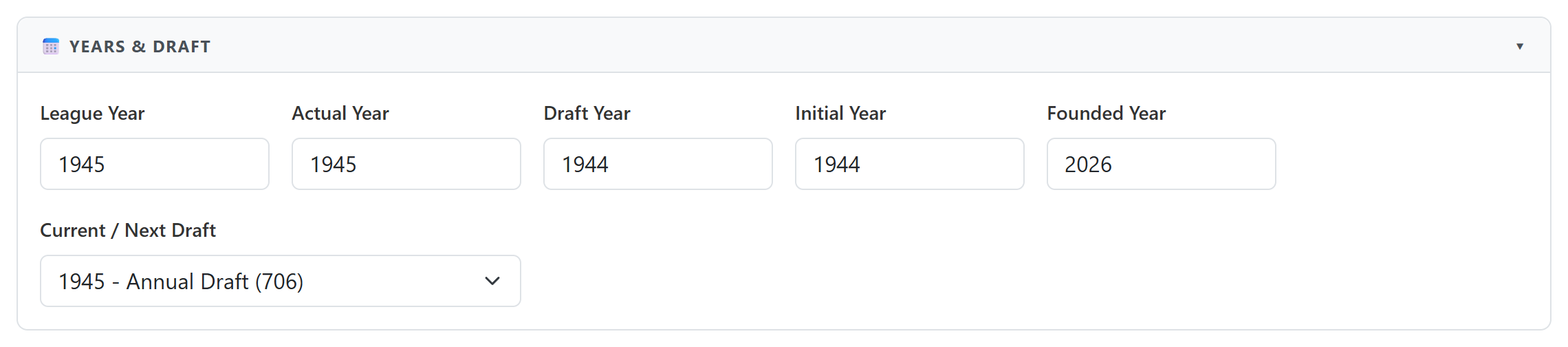
| Setting | What it does |
|---|---|
| League Year | The season the league is playing now. Rosters, trades and the league banner all use it. Advancing the season moves it on by one. |
| Actual Year | The real-life season whose stats and cards the league uses. In a modern league it usually matches League Year. In a replay league it is the year being replayed. |
| Initial Year | The league's first season. The league banner uses it ("Initial season 1944; currently playing our 2nd season"). |
| Current / Next Draft | The draft the league is working on. Draft Central highlights it, Draft Setup and Draft Slots open on it, Apply Order to Current Draft targets it, and advancing the season starts from it. Only regular drafts are listed. |
Keep Current / Next Draft on the draft for the coming season. When you advance, League Toolkit warns you if a later draft exists than the one chosen here. See Start a new season, end to end, phase 4.
Draft Year and Founded Year are saved, but no League Toolkit page uses them today.
Season Management

Advance to Next Season moves the whole league into the next season: rosters, draft picks, contracts and the league year. It opens a check box first that shows the current and next years and any warnings. It cannot easily be undone. The steps, and what each warning means, are in Start a new season, end to end, phase 4.
Personnel & Roster
| Setting | What it does | Who it affects |
|---|---|---|
| Commissioner | The league's commissioner. Trade approval emails go to this person, the co-commissioner and any Roster Admins. | Commissioner |
| Co-Commissioner | A second commissioner. The co-commissioner can open League Admin and use every tool on it, the same as the commissioner. | Co-commissioner |
| File Uploader | One owner who can load each results file (and send the recaps) and the playfile or Play Ball file (and send the preview) on a File Upload page. APBA leagues can also take team results files for missing box scores. This person gets nothing else in League Admin. Pick one of your league's owners, or none. | That owner |
| Admin roles | Tick owners under Draft Admins, Roster Admins and Awards Admins to hand them part of the commissioner's job. Each role opens only its own League Admin tiles (see the table below). Any number of owners can hold each role, and one owner can hold several. League Info, Team Info, ownership, the season advance and billing stay with the commissioners. | The owners you tick |
What each admin role can do
| Role | What it opens |
|---|---|
| Draft Admin | The Draft Setup, Draft Slots, Draft Picks, Draft Order Rules and Draft History tiles, including creating, resetting and adding rounds to drafts and setting the Current / Next Draft. Draft Administration in every draft of the league, and the Waiver Wire Draft. |
| Roster Admin | Roster Management, League Transactions, Process Trade, Trade Proposals (including approving and denying trades), Waiver Pool, Waiver Claim Log and the contracts part of Data Import. Outside League Admin: signing and releasing free agents for any team, any team's cutdown and depth chart, the RFA auction admin and the roster cap issues report. Not Import Rosters. |
| Awards Admin | Awards Voting, Player Awards, Hall of Fame, Team Trophies, Auto-Trophy Rules, In Memoriam, and the trophies and awards parts of Data Import. |
Someone with a role sees a League Admin tile on the dashboard, and inside it only the tiles their roles open. If an owner holding a role leaves the league, they show as not in this league in the list; untick them before you save. See Give an owner an admin role. | Deadlines | Results due, at, of week, Lineup changes due and at. Used in the recap and Play Ball email subjects and in the due dates inside those emails. Leave them on Default to use the sport's normal deadlines. Of week is which week of the set the results are due in; Day after results makes changes due the day after the recap goes out. | Owners see it, in emails | | Teams | The number of teams in the league. When the league advances, the new draft is built for this many teams. Add Expansion Team on Team Info raises it by one for you. | Commissioner | | Roster Size | The most players a team can carry. It is the cutdown target when Cutdown Size is blank, and the limit used for waiver claims, free-agent signings and trades when those limits are on. | Owners see it | | Prospect Slots | How many prospects a team can hold. Shown on the cutdown page, and enforced when Enforce Prospect Max on Trades or Hard-Cap Prospects in Draft is on. | Owners see it | | Inactive Roster Size | The most players a team can put on its inactive list, from 0 to 20. Only used when the Inactive Roster switch is on. | Owners see it |
Email & Notifications
Group Email is the address the league's own emails go to, usually your league's group mailing list. It receives, among others:
- trades that go through, free-agent moves and waiver claims
- draft pick emails and the draft start
- award and Hall of Fame ballots and results
- recaps, previews and Play Ball emails
- polls, including the Returning Owners Poll
- the welcome email when a team changes ownership
Trial and billing emails from the group
Your league's group is not part of League Toolkit. It is run by Google Groups or groups.io, and the person who set it up is its owner. League Toolkit only sends mail to it, and it works with the free plan.
That provider writes to the group's owner now and then: a free trial of a premium plan has ended, storage is running low, a payment is due. Those emails come from Google or groups.io, even when they use your league's name. They are not from League Toolkit, and you don't need to pay for anything for League Toolkit to keep working. When a groups.io trial ends, the group simply moves to the free plan and keeps passing on email.
Setting up a new group? A free Google Group works well and doesn't start you on a trial.
Feature Flags

| Switch | When it is on | Who it affects |
|---|---|---|
| Active League | The league is live. | Everyone |
| Contract League | Contracts are tracked. Rosters, team pages, player cards and the trade pages show contract columns, and the Contract Year Cap field appears under Trade Proposals. | Owners see it |
| Salary League | Salaries are tracked. Team pages get a Salary Cap tab, rosters show salaries and a team total, and draft reports show salary columns. | Owners see it |
| Prospect League | The league keeps prospects. Team pages get a Prospects tab, and the draft lets owners add and search for prospects. | Owners see it |
| Inactive Roster | Owners can move players to an inactive list from the cutdown page, up to Inactive Roster Size. | Owners see it |
| Retro League | The league replays past seasons. Baseball and hockey team pages get a Roster Forecast tab. When it is off (a modern league), subscribers to Fantasy Stat Tracker get a forecast tab instead. It also changes which stat season the draft and the loaders use. | Owners see it |
| Forward Direction | The league year goes up each season (1944, then 1945). Off: it goes down (1992, then 1991), as some replay leagues do. Advancing, draft years and the lottery all follow it. | Everyone |
Switching Active League off takes the league offline. Its pages stop opening, and it drops off the home page and the League Openings page. Only switch it off when the league is closing.
Franchise League is saved, but no League Toolkit page uses it today. The Franchise History tab on team pages appears on its own when teams are linked with the Franchise History tile.
League Settings
This big section holds the optional features. It is in two columns, then a few groups underneath.
Roster moves
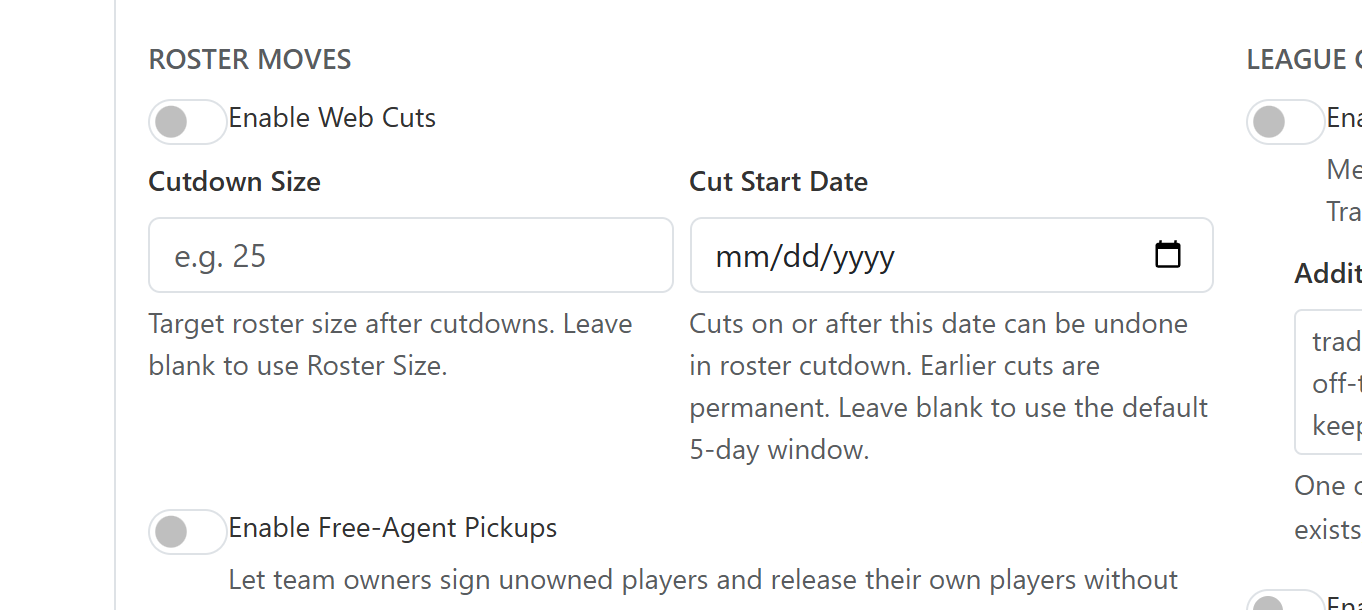
| Setting | What it does | Who it affects |
|---|---|---|
| Enable Web Cuts | Owners can cut their own rosters on the cutdown page. The league home page shows a cutdown notice while it is on. | Owners see it |
| Cutdown Size | The roster size each team must cut down to. Blank: Roster Size is used. | Owners see it |
| Cut Start Date | Cuts made on or after this date can be undone on the cutdown page. Earlier cuts are permanent. Blank: cuts can be undone for 5 days. | Owners see it |
| Enable Free-Agent Pickups | Owners can sign unowned players and release their own players without you. A Free Agents tile appears on the league home page. Every move is recorded on the Transactions page and emailed to the league. | Owners see it |
| Max FA Signings / Team | How many free agents each team can sign in a season. Blank: no limit. | Owners see it |
| Enable Waiver Pool | Turns on the waiver pool: owners claim players from it, and the Waiver Pool and Waiver Claim Log tiles appear on League Admin. | Owners see it |
| Max Waiver Claims / Team | Waiver claims per team per league year, Standard and Emergency together. Default 4. | Owners see it |
| Enable Waiver Wire Draft | Adds the Waiver Wire Draft tile to League Admin, where you create and run a live draft from the free-agent pool. | Commissioner |
If both Enable Free-Agent Pickups and Enable Waiver Pool are on, the page shows a warning. Most leagues use one or the other: pickups are open self-serve signings, the waiver pool is a claim queue.
Games & stats
Baseball leagues. APBA GO league appears only for APBA baseball leagues.
| Setting | What it does | Who it affects |
|---|---|---|
| Enable game-by-game box score entry | For leagues that roll games by hand. Adds the Schedule & Box Scores tile to League Admin, where you keep a schedule and key in or upload each box score; stats, standings and leaders build up as games are finished. Seasons already loaded from a file are not affected. | Commissioner, and anyone you let enter games |
| APBA GO league | Your stats come from APBA GO season exports. Shows the APBA GO Import tile, adds an APBA GO Code field to each team on Team Info, and hides the APBA Stat Loader tile. | Commissioner |
League community
| Setting | What it does | Who it affects |
|---|---|---|
| Enable League Chat | Members-only live group chat. League Chat appears in the floating menu. There are no email or push notifications. Trade messages and direct messages work either way. | Owners see it |
| Additional Chat Channels | Extra chat channels, one per line, using lowercase letters, numbers and dashes. general always exists. | Owners see it |
| Enable Polling Station | You can create polls for the league. Polls appears in the floating menu and on Archives & Polls. | Owners see it |
| Let any member create polls | Any member can create a poll, not just you. Only you can close or delete polls either way. Needs Enable Polling Station. | Owners see it |
Pages & display
| Setting | What it does | Who it affects |
|---|---|---|
| Enable Trophy Case | Adds a Trophy Case to each team page, listing all its championships and trophies. The small trophy icons in the team banner show either way. | Owners see it |
| Show standings on the Organization page | Adds the current standings to each division on the Organization page. Between seasons, the last season loaded is shown. | Owners see it |
| Enable Roster Warnings | Baseball only. Adds a Roster Warnings tab to each team page that flags positions short on at-bats and staffs short on innings for a full season. On unless you switch it off. | Owners see it |
Awards Voting and Hall of Fame Voting
| Setting | What it does |
|---|---|
| Enable Awards Voting | Owners can vote on awards, and the awards tile on the league home page invites them to vote. Opening and closing a ballot on the Awards Voting tile switches this on and off for you. |
| Split Auto-Awards by Sub-League (AL/NL) | Awards that League Toolkit works out from the stats get one winner per sub-league instead of one for the whole league. |
| Enable HOF Voting | Owners can open the Hall of Fame ballot and vote. Opening and closing a ballot on the Hall of Fame tile switches this on and off for you. Whether a ballot is open is set on the Hall of Fame tile. |
Trade Proposals
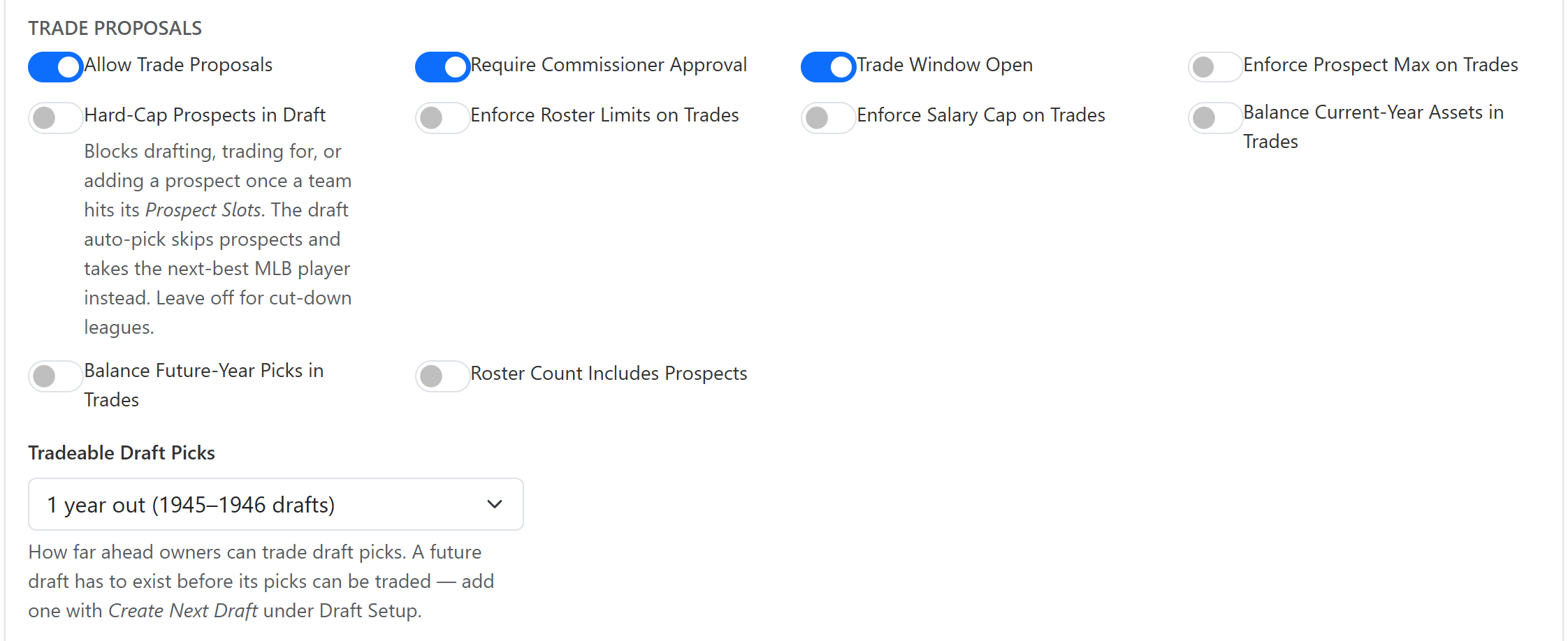
| Setting | What it does | Who it affects |
|---|---|---|
| Allow Trade Proposals | Owners can send each other trade offers. Team pages get a Propose Trade button and a Trade Proposals tab. | Owners see it |
| Require Commissioner Approval | An accepted trade waits for you instead of going through at once. You (or a Roster Admin) approve or deny it on the Trade Proposals tile; the commissioners and Roster Admins get an email. | Owners see it |
| Trade Window Open | Trading is open. Off: the Propose Trade button is greyed out with a lock, and offers cannot be sent, revised or accepted. | Owners see it |
| Enforce Prospect Max on Trades | A trade offer is refused if it would put either team over Prospect Slots. | Owners see it |
| Hard-Cap Prospects in Draft | A team at its Prospect Slots cannot draft, trade for, or be given another prospect. Draft auto-picks skip prospects and take the next-best major-league player. Leave it off for leagues that cut down after the draft. | Owners see it |
| Enforce Roster Limits on Trades | Trades, and free-agent signings, are refused if they would put a team over Roster Size. | Owners see it |
| Enforce Salary Cap on Trades | A trade offer is refused if it would put either team over the salary cap. | Owners see it |
| Balance Current-Year Assets in Trades | Each side must give the same number of this-season assets (players, prospects and this year's picks). Stops 2-for-1 deals. | Owners see it |
| Balance Future-Year Picks in Trades | Future picks must match year for year: a 2027 pick must come back as a 2027 pick. | Owners see it |
| Roster Count Includes Prospects | Active prospects count toward Roster Size when roster limits are checked, for example on waiver claims and free-agent signings. For leagues with one combined limit. | Owners see it |
| Tradeable Draft Picks | How many years ahead owners can trade picks, from 1 to 5. A future draft has to exist before its picks can be traded; add one with Create Next Draft on Draft Setup. | Owners see it |
| Contract Year Cap | Contract leagues only. The most contract years a team can hold in total. A trade that would put a team over it is refused. Blank: no cap. | Owners see it |
How trade offers look to owners is in Propose a trade, and answer one.
Links & Documents
| Setting | What it does |
|---|---|
| Custom Constitution PDF | The Constitution page shows your PDF instead of the written constitution. |
| Constitution PDF Filename | The name of that PDF. When you upload a PDF on the Constitution tile, both of these are filled in for you. |
Show AT Manager Links is saved, but no page uses it today.
Draft Eligibility Minimums
Baseball leagues.
Leave low-usage players out of the draft. Tick Use Draft Minimums, then fill in Hitters: Min AB, Pitchers: Min IP and Pitchers: Min G. A pitcher who reaches either the innings or the games minimum is eligible. They are measured on the draft's stat season; leave a box blank to skip that minimum.
The minimums apply to the draft's available-player lists, player search and Draft List auto-picks, and they block a pick of a player below them. Prospects drafted at a minor-league level are not affected. Owners see it.
Standings Scoring and Games-Played Allowance
Hockey leagues.
Standings Scoring should match the standings options in your game, so the standings League Toolkit builds from your uploads score the same way:
- Points System: Standard 2-1-0, or 3-2-1-0 (3 for a regulation win, 2 for an overtime or shootout win, 1 for an overtime or shootout loss).
- One Point for Overtime Loss: off means an overtime or shootout loss is just a loss.
The results loader checks each upload against these and warns you if they do not match.
Games-Played Allowance adds a check to each team's roster page: does the roster have enough games played to cover the schedule at each position? Fill in Games in Season, Usage Allowance % (110 means a player may play 110% of his real games), and Forward Slots, Defense Slots and Goalie Slots (players dressed per game). Leave it blank to hide the check. Owners see it.
Website Branding
| Setting | What it does |
|---|---|
| Logo #2 Filename | A second logo, shown on the league banner when the main logo was not uploaded through Upload New Logo. |
| Player Image Folder URL | Set by the site admin. |
| Schedule Start Date and Schedule End Date | Add "Season starts" and "Season ends" to the league calendar. |
Header Tagline and Home Page Intro Message (HTML) are saved, but no page shows them today.
Website Colors
Each colour has a picker and a box for the code (such as #004080).
| Colour | Where it shows |
|---|---|
| Header | The league banner, the League Admin tile on the league home page, and the main colour on draft pages, team pages, the constitution and the floating menu. |
| Background | An accent colour on draft pages, the constitution and the floating menu. It is not the page background. |
Footer, Toolbar, Toolbar Line, Toolbar Fine Line and Stat Header are saved, but no page uses them today.