Your Draft List is your own ranked list of players: 1, 2, 3 and so on. If you turn it on, League Toolkit drafts the highest available player on it as soon as your turn comes, so you do not have to be online.
Two words to keep apart:
- Watch list: every player you have starred. Starred players that are not ranked yet wait in the Watch Pool.
- Draft List: the players you have put in order. Only this list is used to pick for you.
1. Star the players you like
On the draft page, choose Reports in the bottom toolbar.
Choose Available Hitters (or Available Pitchers).
Choose a tab to sort the players, for example WAR. The first time, the list can take about 10 seconds to appear.
Choose the blue + at the left of a player's row to add him to your watch list. It turns into a red −. Choose the − to take him off again.
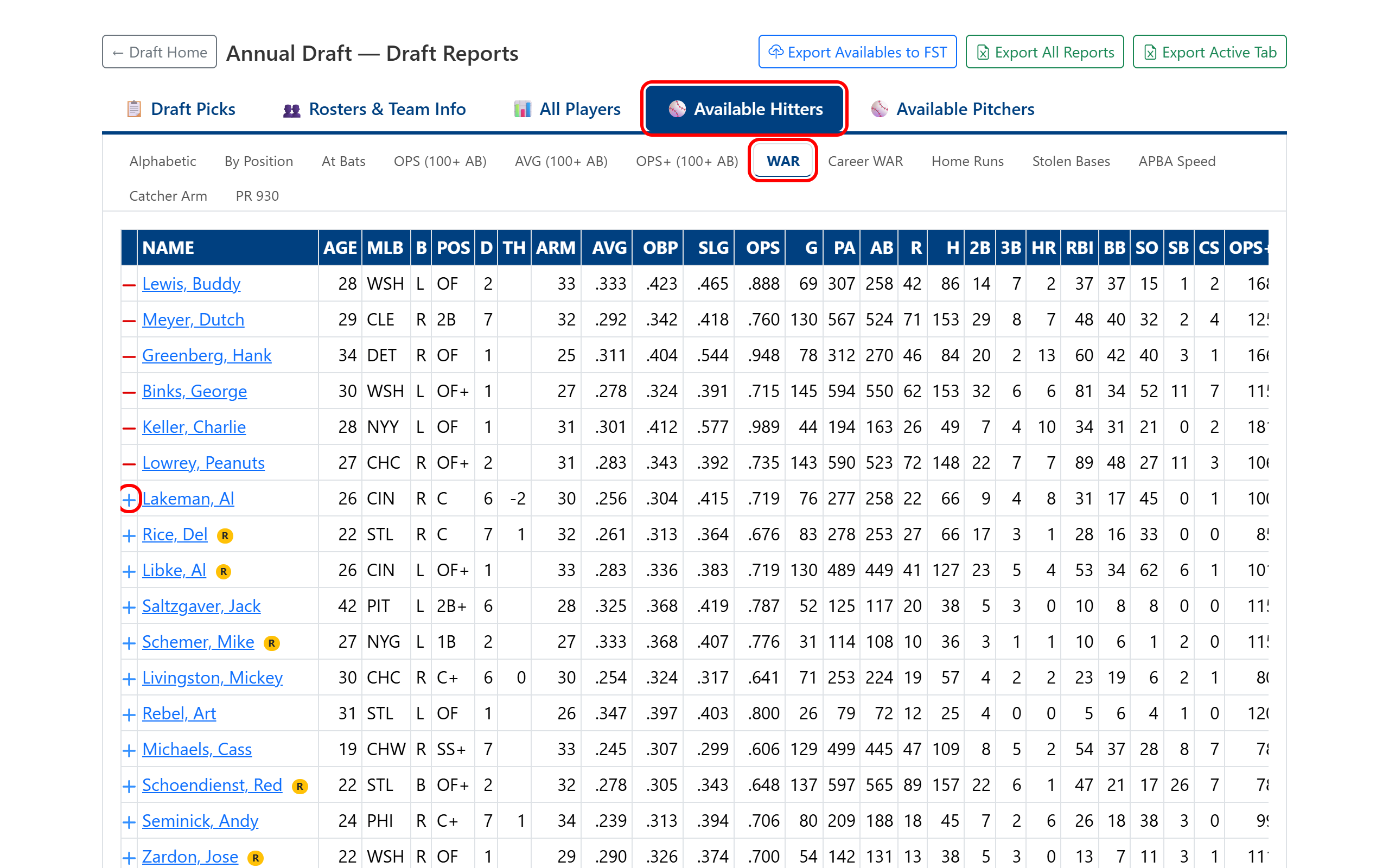
Star as many players as you like. Each one goes into your Watch Pool.
2. Put them in order
Choose Draft List in the bottom toolbar.
Your starred players are in the Watch Pool on the left. Choose Add All to move them all to the Draft List on the right, or choose → next to one player to move just him. You can also drag a player across.
Put the Draft List in the order you want, best player first:
- Drag a player up or down, or use ↑ and ↓ to move him one place.
- Or choose Sort by WAR to put the list in WAR order, highest first. This replaces your current order, so the page asks you first. Some leagues also have Sort by Career WAR.
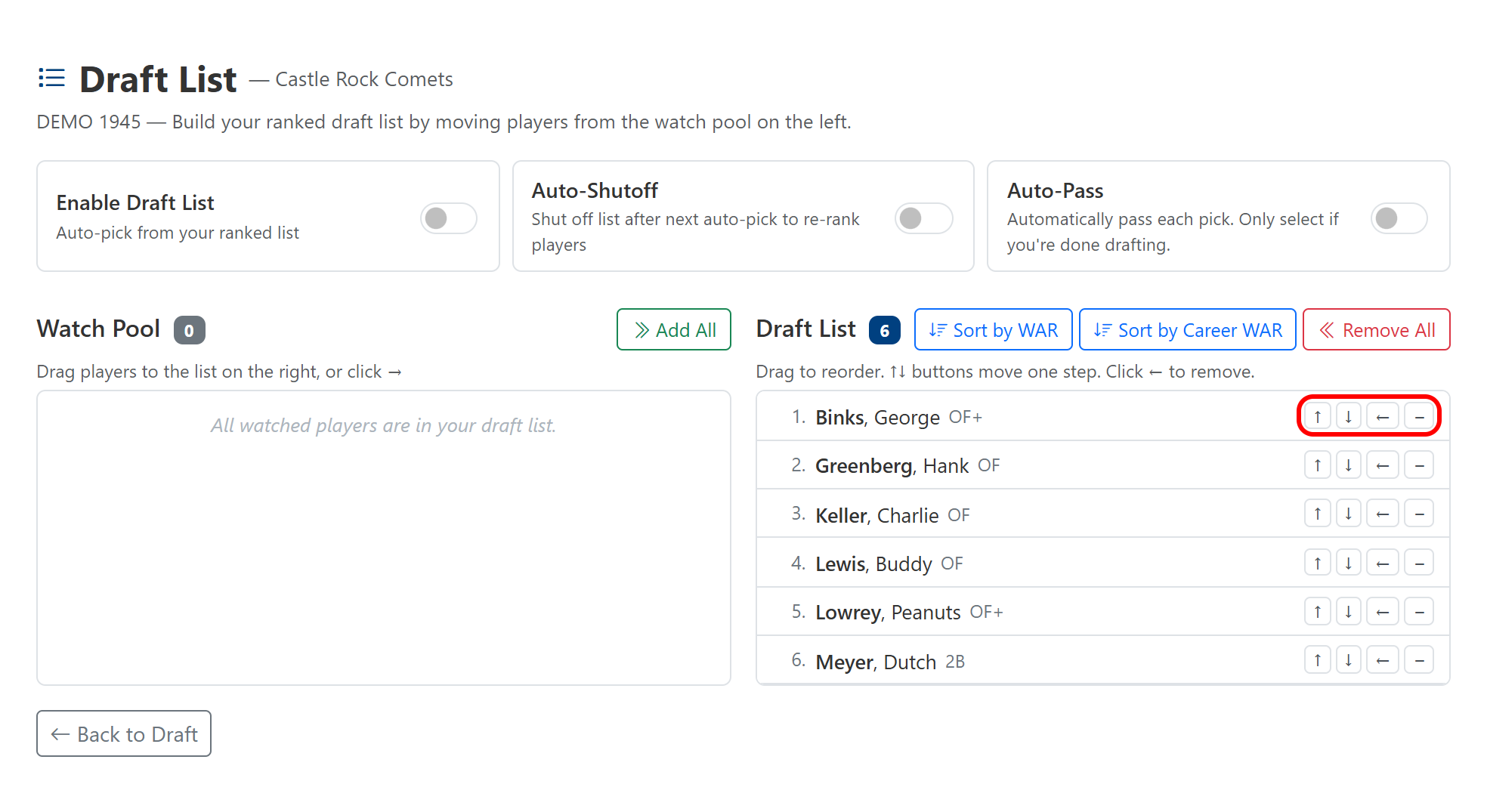
Changes save on their own. Under the lists you see Saving… and then Saved ✓. There is no Save button.
To take players out:
- ← moves a player back to the Watch Pool. He stays starred.
- Remove All moves every player back to the Watch Pool.
- The red − takes a player off your watch list completely. The page asks you first.
When any team drafts a player, he disappears from every Draft List and Watch Pool by himself. You do not need to remove him.
3. Turn it on
The three switches at the top of the Draft List page decide what League Toolkit does for you. Choose a switch to turn it on or off; the page reloads with the new setting.

- Enable Draft List: when your turn comes, League Toolkit drafts the highest player on your Draft List who is still available. It skips players who are already taken. If nobody on your list is left, nothing is drafted and you pick by hand as usual.
- Auto-Shutoff: after your Draft List makes one pick, Enable Draft List turns itself off. Use this if you want to look at your list again before every pick. Turn Enable Draft List back on when you are ready.
- Auto-Pass: every one of your picks is passed straight away, and nobody is drafted. Turn this on only when you are done drafting. While it is on, it wins over your Draft List.
On the draft page, a team in the On Deck box with its list turned on shows a small List label with the number of players on its list.
If you are already on the clock
When it is already your turn, the Draft List page shows a yellow You're on the clock. message. Turning on Enable Draft List then drafts your top available player right away. If the list is already on, any change you save (adding, moving or sorting players) also drafts your top player right away.

In the same way, turning on Auto-Pass while you are on the clock passes your pick right away.